In the previous episodes, we started getting our hands dirty with SIP and Kamailio. This time, we’re tackling a core component of any VoIP platform: the SIP registrar.
Said like that, it might sound a bit dry. In reality, it’s quite simple: the registrar is the directory that tells us where to reach a SIP phone at any given moment. Because yes, your phone or softphone can change its IP address, go behind a router, reboot, switch networks, and yet, we still need to be able to send calls to it.
In this Kamailio tutorial, we’ll configure a SIP registrar capable of accepting REGISTER requests and storing SIP client contacts in its location table.
What is a SIP registrar?
The first use case we’ll explore in this series is the registrar. It’s an essential building block for anyone who wants to connect SIP clients, typically phones or softphones, whose IP addresses can change over time.
You can think of a SIP registrar as a dynamic directory.
In a traditional directory, you look up a name and get a phone number. With a SIP registrar, it’s a bit of the opposite: Kamailio knows a subscriber’s SIP identifier, for example, sip:0263111111@voip.cyanet.fr, and it knows which IP address and port to send SIP messages to in order to reach them.
The important nuance is that this directory changes all the time. A softphone can switch from Wi-Fi to 4G, a phone can reboot, a router can renew its public IP, a NAT device can change the source port… In short, without a registrar, reaching a SIP subscriber quickly becomes like looking for a needle in a haystack.
When a SIP phone starts up, it can’t just idly wait for calls, hoping the network will figure it out. It first needs to tell the server: “Hey, I’m here, here’s my IP address, my port, and here’s how long you can consider this information valid.”
That’s exactly the role of the REGISTER request.
AoR, Contact, IP, and Port: Who Does What?
A SIP registrar is a key component in VoIP that handles REGISTER requests sent by SIP clients, also known as UACs (User Agent Clients). It stores the information needed to reach these clients, notably their Address of Record, often abbreviated as AoR.
The AoR is a public SIP URI, for example, sip:0262799974@voip.cyanet.fr. It’s the subscriber’s stable SIP identity. The registrar then associates this identity with a real contact address: IP address, port, transport protocol, validity duration, sometimes the User-Agent, and other useful information.
Basically, the SIP registrar is the living address book of your VoIP platform.
When a subscriber later sends an INVITE request to another subscriber, the SIP proxy can query the location table to know where to send the call. If the recipient’s AoR is registered, Kamailio can forward the request to the correct contact. Otherwise, we can, for example, return an error or send the call to a default destination, like an operator trunk.
An important clarification: in this tutorial, we will only set up the registrar part. The configuration presented below does not yet route calls between two subscribers. INVITE requests will be intentionally rejected with a 480 Temporarily Unavailable error. We’re building step by step, at a relaxed pace.
What Does a SIP Directory Look Like?
When you use a SIP desk phone, a softphone, or even some modern mobile services like VoLTE, the device signals its presence to a registrar. The registrar saves its identifier, IP address, and listening port to enable call reception later.
You can imagine the registrar as a directory containing the phone number, AoR, IP address, port, and registration duration.
| Phone Number | AoR | IP Address | Port | Expires (s) |
| 0262 799 974 | sip:0262799974@voip.cyanet.fr | 102.215.220.11 | 4758 | 3600 |
| 0263 111 111 | sip:0263111111@voip.cyanet.fr | 100.64.24.16 | 6050 | 1800 |
| 0263 222 222 | sip:0263222222@voip.cyanet.fr | 80.67.167.84 | 64974 | 1800 |
The Expires column is important: a SIP registration is not eternal. The client indicates a validity duration, often via the Expires header or an expires parameter in the Contact header. Before this time elapses, the phone must renew its registration with a new REGISTER request.
If it doesn’t, the contact expires, and Kamailio considers the subscriber unreachable.
Another interesting detail: a single AoR can have multiple contacts. For example, a user might be connected simultaneously from a desk SIP phone and a mobile softphone. Kamailio can then maintain multiple contacts for the same subscriber, depending on the configuration used.
Simple Example: One Subscriber Calls Another
Let’s imagine that 0263 111 111 wishes to call 0263 222 222, and both subscribers are properly registered on Kamailio.
- 0263 111 111 sends an
INVITErequest to Kamailio. - Kamailio identifies the target number.
- Kamailio searches for the recipient’s AoR in its
locationtable. - If the recipient is registered, Kamailio forwards the
INVITErequest to their IP address and port. - 0263 222 222’s phone rings.
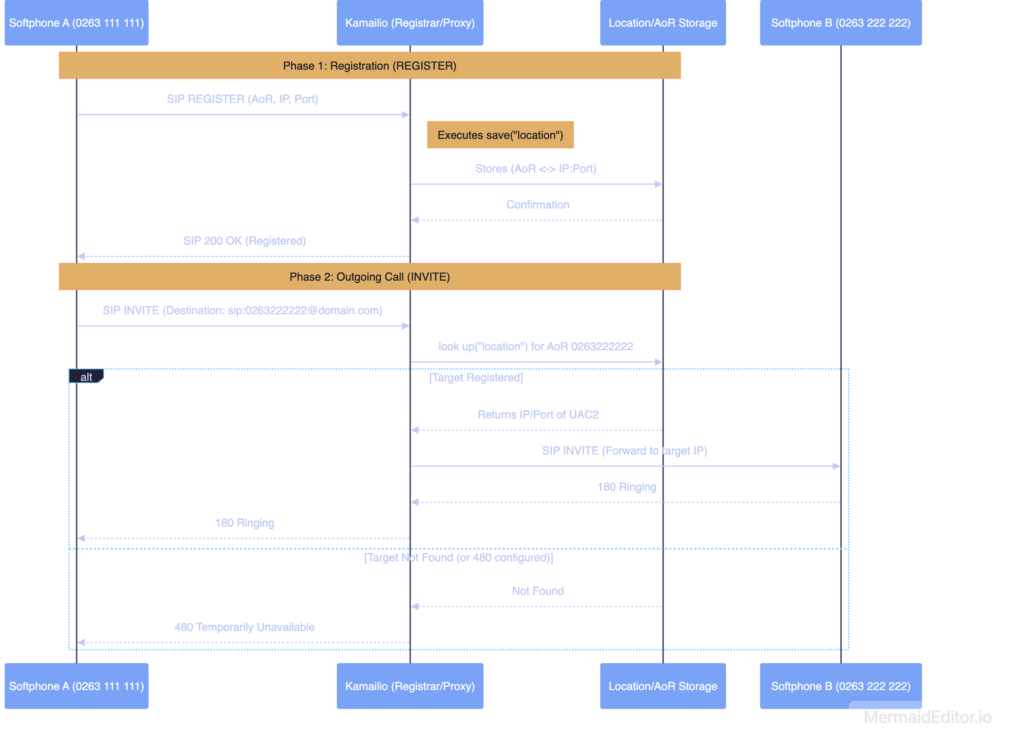
With this simple example, you already have a good intuition of how many applications that offer calls work, whether it’s FaceTime, Signal, WhatsApp, or other similar services. The general principle remains the same: the service needs to know where to reach your device at any given moment.
Obviously, in real life, there’s a bit more engineering involved: encryption, push notifications, NAT traversal, media relay, authentication, high availability, anti-abuse measures, etc. But to understand the registrar’s role, we’ll keep it simple.
The Difference Between a Registrar and a SIP Proxy
An important clarification: a SIP registrar doesn’t necessarily handle call routing. Its primary role is to manage SIP client registrations.
In a classic architecture, Kamailio can perform multiple roles:
- SIP Registrar: It receives
REGISTERrequests. - SIP Proxy: It routes
INVITE,ACK,BYE, etc., requests. - Authentication Server: It verifies subscriber authorization.
- SIP Frontend: It protects and exposes the VoIP infrastructure.
- Operator Entry Point: It can relay calls to a SIP trunk or a core network platform.
In this tutorial, we are deliberately focusing on the registrar part. INVITE requests will be rejected with a 480 Temporarily Unavailable error, to keep the configuration minimal and easy to understand.
Configuring Kamailio as a SIP Registrar
Now that we’ve seen what a SIP registrar is, let’s program one using Kamailio. I’ll repeat myself, but it’s important: Kamailio doesn’t do anything “magically” by default. You need to tell it precisely what to do when it receives a SIP request.
The scenario is therefore as follows:
- The softphone starts up.
- It sends a
REGISTERrequest to Kamailio. - Kamailio extracts the AoR, contact address, IP address, port, and expiration duration.
- Kamailio saves this information in its
locationtable. - The softphone receives a
200 OKresponse. - As long as the registration is valid, Kamailio knows where to reach this SIP client.
Kamailio Modules Used
Behind the simple save("location") instruction, Kamailio primarily uses two modules:
registrar: Provides the logic for processingREGISTERrequests.usrloc: Stores SIP contacts in a table calledlocation.
In our example, the location table is kept in RAM. This is perfect for a lab, a tutorial, or initial testing. For a production platform, you’ll likely need to store this information in an external database like MariaDB, Redis, or MongoDB.
Here’s a minimalist excerpt of the modules needed in your Kamailio configuration:
loadmodule "sl.so"
loadmodule "registrar.so"
loadmodule "usrloc.so"

# Store contacts in RAM
modparam("usrloc", "db_mode", 0)
Depending on your complete configuration, you’ll obviously have other modules loaded. Here, the idea is simply to highlight those necessary to understand the SIP registrar’s role.
Minimal Registrar Configuration
Here’s the main route. It receives incoming SIP requests and decides what to do with them.
/*
 * Kamailio's main entry point
 */
request_route {
    /*
     * In this tutorial, we don't handle calls yet.
     * Any INVITE request will receive a 480 response.
     */
    if (is_method("INVITE")) {
        sl_reply("480", "Temporarily Unavailable");
        exit;
    }

    /*
     * When a SIP client sends a REGISTER request,
     * we save its contact in the "location" table.
     *
     * The save("location") function is provided by the registrar module.
     * It stores the AoR, contact address, port, and expiration.
     *
     * Warning: In this example, no authentication is performed.
     * Do not expose this configuration as-is on the internet.
     */
    if (is_method("REGISTER")) {
        xlog("L_INFO", "SIP registration received for AoR: $fu, contact: $fU, from IP: $si:$sp\n");
        save("location");
        exit;
    }

    /*
     * All other SIP methods are not yet implemented.
     */
    sl_reply("501", "Not Implemented");
}
I’ve deliberately stripped down this configuration to keep only the instructions that interest us. In the default route, the equivalent of a main entry point, we save the client’s AoR when we receive a REGISTER request.
For now, that’s all we do. INVITE requests return a 480 Temporarily Unavailable error, and all other requests will receive a 501 Not Implemented error.
Warning: This configuration is deliberately simplified to understand the registrar mechanism. It should not be exposed as-is on the internet.
In production, you’ll need to add at least:
- SIP authentication with username and password;
- SIP domain verification;
- A brute-force protection policy;
- Rate limiting for requests;
- Network protection via firewall, SBC, or specific rules;
- A thorough consideration of NAT handling.
Otherwise, your server could quite quickly become a playground for SIP bots scanning the internet day and night. And believe me, they’re not coming to wish you good luck. In fact, if you leave your SBC open with an operator trunk attached, bots might start making premium-rate calls, and you’ll end up paying a hefty bill.
Confirming Registrar Functionality
To verify that our Kamailio registrar is working correctly, I’ll use three tools:
- Gnome Calls, a VoIP softphone for Linux;
sngrep, to observe SIP requests;- Kamailio’s command-line tools, to inspect the
locationtable.
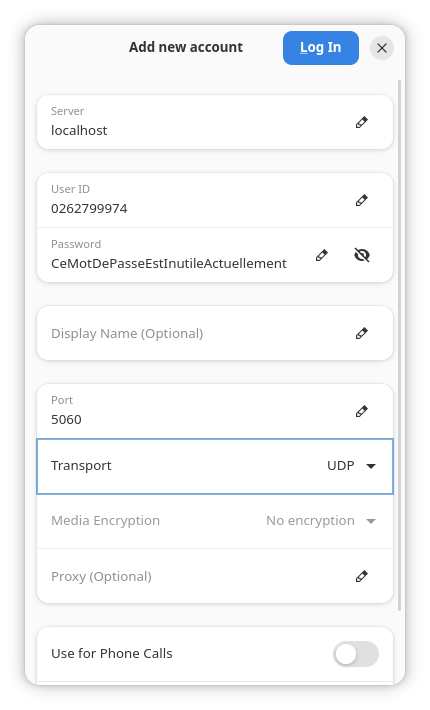
The testing process is quite straightforward:
- Start Kamailio with the registrar configuration.
- Launch
sngrepin a terminal. - Open a softphone and configure a SIP account pointing to Kamailio.
- Verify that the softphone sends a
REGISTERrequest. - Confirm that Kamailio responds with a
200 OK. - Check that the AoR appears in the
locationtable.
In sngrep, you should see a brief exchange between the softphone and Kamailio:
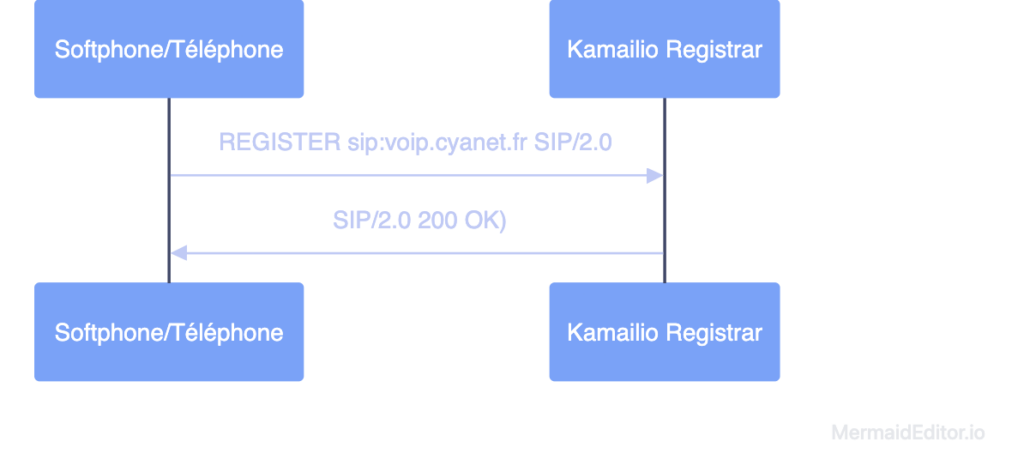
This is a good sign: the phone announces itself, Kamailio accepts the registration, and the contact is saved in memory.
Checking the Location Table with kamcmd
Once the softphone is registered, you can check what Kamailio has in memory with the following command:
kamcmd ul.dumpDepending on your installation, you might also use:
kamctl ul showYou should see your user’s AoR, their SIP contact, IP address, port, and the remaining expiration time appear.
You’ll also notice in the Kamailio logs that it indicates successful AoR registration in memory.
Note: In my case, I configured Gnome Calls to register with Kamailio on localhost. Make sure to adjust the SIP server address, domain, and network settings according to your testing conditions.
What This Tutorial Doesn’t Cover Yet
At this stage, our Kamailio can receive REGISTER requests and store SIP contacts in its location table. That’s already a great first step.
However, it still doesn’t:
- Authenticate subscribers;
- Route calls between two subscribers;
- Properly handle clients behind NAT;
- Connect calls to an operator trunk;
- Store AoRs in an external database;
- Secure exposure to the internet.
And that’s fine. Kamailio is powerful, but it’s better to proceed step by step rather than copy-pasting a 900-line configuration without understanding what it does.
In a real network, many SIP phones are behind NAT. This may require additional mechanisms on the Kamailio side, notably with modules like nathelper and sometimes using RTPEngine to correctly manage RTP media streams. Here, we’re deliberately sticking to basic SIP signaling.
In Conclusion
And there you have it, we now have a Kamailio capable of acting as a SIP registrar. It’s not yet a full VoIP platform, but it’s a fundamental building block. Without a registrar, it’s impossible to know where to reach your subscribers. With it, Kamailio can maintain a dynamic directory of connected clients, even if their IP addresses change.
In this deliberately simple version, AoRs are stored in RAM and no authentication is applied. For a lab, it’s perfect. For the internet, much less so. In a follow-up article, we can therefore add SIP authentication, NAT management, or call routing between two subscribers.
In this tutorial, we started from the premise that AoRs are only kept in RAM. If you want to go further, know that it’s possible to use databases like Redis, MariaDB, or MongoDB.
In a high-availability context, it can be interesting to store AoRs in an external database to have redundant Kamailio instances. This is also an interesting avenue for geo-redundancy and centralizing SIP registrations across multiple regions.
The logical next step will be to add the missing pieces: authentication, persistence, NAT, call routing, and security. In short, everything needed to move from a fun little lab setup to a more serious VoIP platform.


Great content! Keep up the good work!